A complete, highly detailed walkthrough for business owners, developers, and marketers. Learn exactly how to optimize your TYPO3 website to rank higher, drive massive traffic, and beat your competition in search results.
Table of Contents
- What is TYPO3 CMS?
- TYPO3 SEO Basics
- On-Page SEO in TYPO3 (Detailed)
- Technical SEO in TYPO3 (Detailed)
- TYPO3 SEO Extensions
- TYPO3 URL Structure Best Practices
- Common TYPO3 SEO Mistakes
- Real-Life Practical Tips
- TYPO3 vs WordPress
- Drupal vs TYPO3
- TYPO3 vs Joomla
- TYPO3 vs Other CMS (Table)
- Frequently Asked Questions
- Complete TYPO3 SEO Checklist
What is TYPO3 CMS?
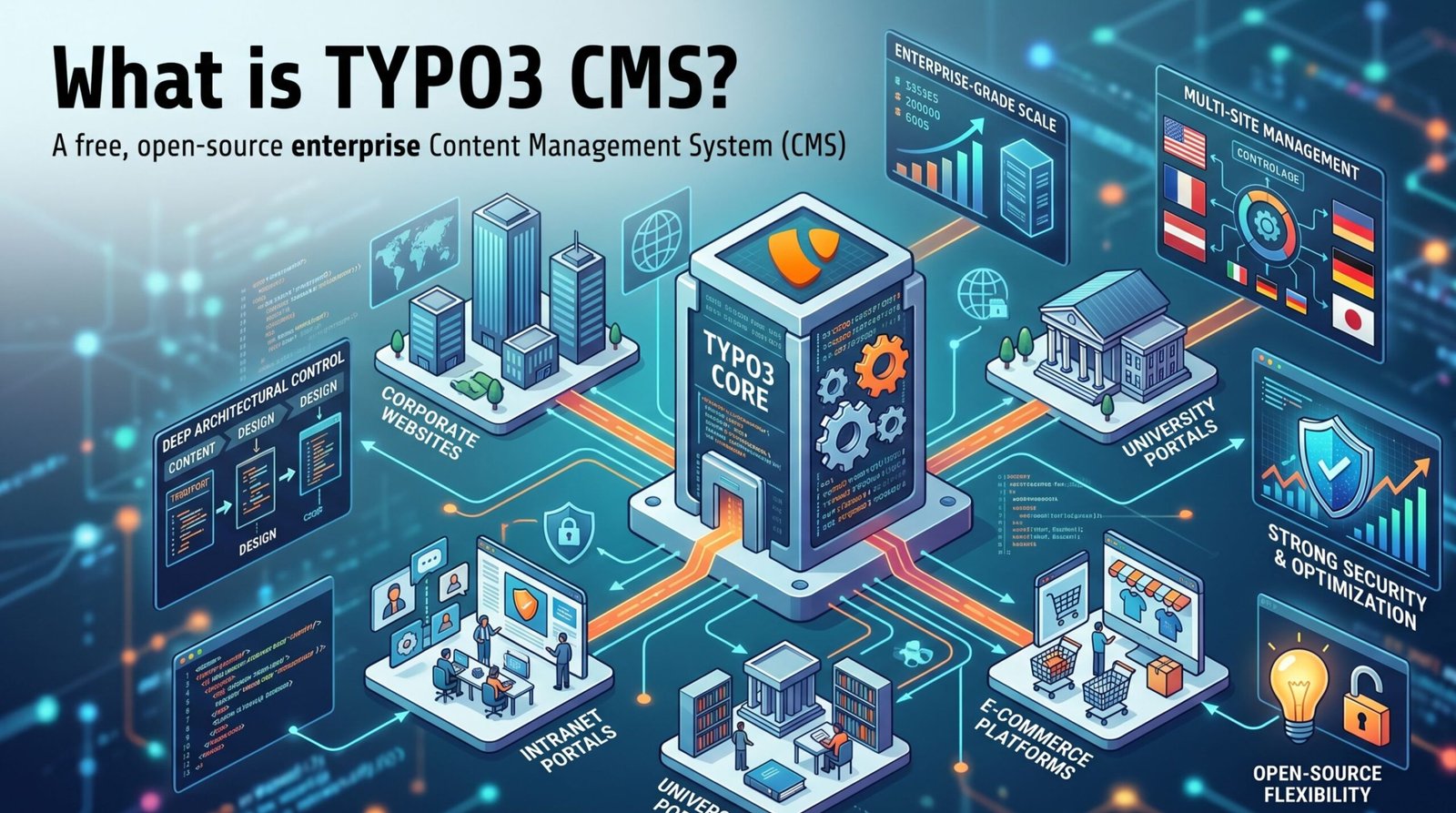
When you hear people talk about content management systems, you usually hear about platforms built for simple blogs or small business sites. TYPO3 is different. Created in 1997, it has grown into a highly robust, enterprise-grade system. Large universities, government organizations, and massive global corporations rely on it daily.
Unlike simpler platforms, TYPO3 separates content from design entirely. This means developers can build deeply complex website architectures without breaking the frontend experience. Furthermore, it supports multiple websites within a single backend installation. If you run a company with branches in twenty different countries, you can manage all twenty regional websites from one central TYPO3 dashboard.
Because the platform targets large-scale operations, it requires a higher level of technical knowledge to set up. You cannot simply press a single button and launch a site in five minutes. However, this complexity is exactly what makes it so secure and adaptable. Regarding optimization, having a deep, structural platform means you have total control over every single piece of code rendered on your web pages. When properly configured by a professional, a TYPO3 website can outperform almost any other CMS in search engine rankings.
TYPO3 SEO Basics
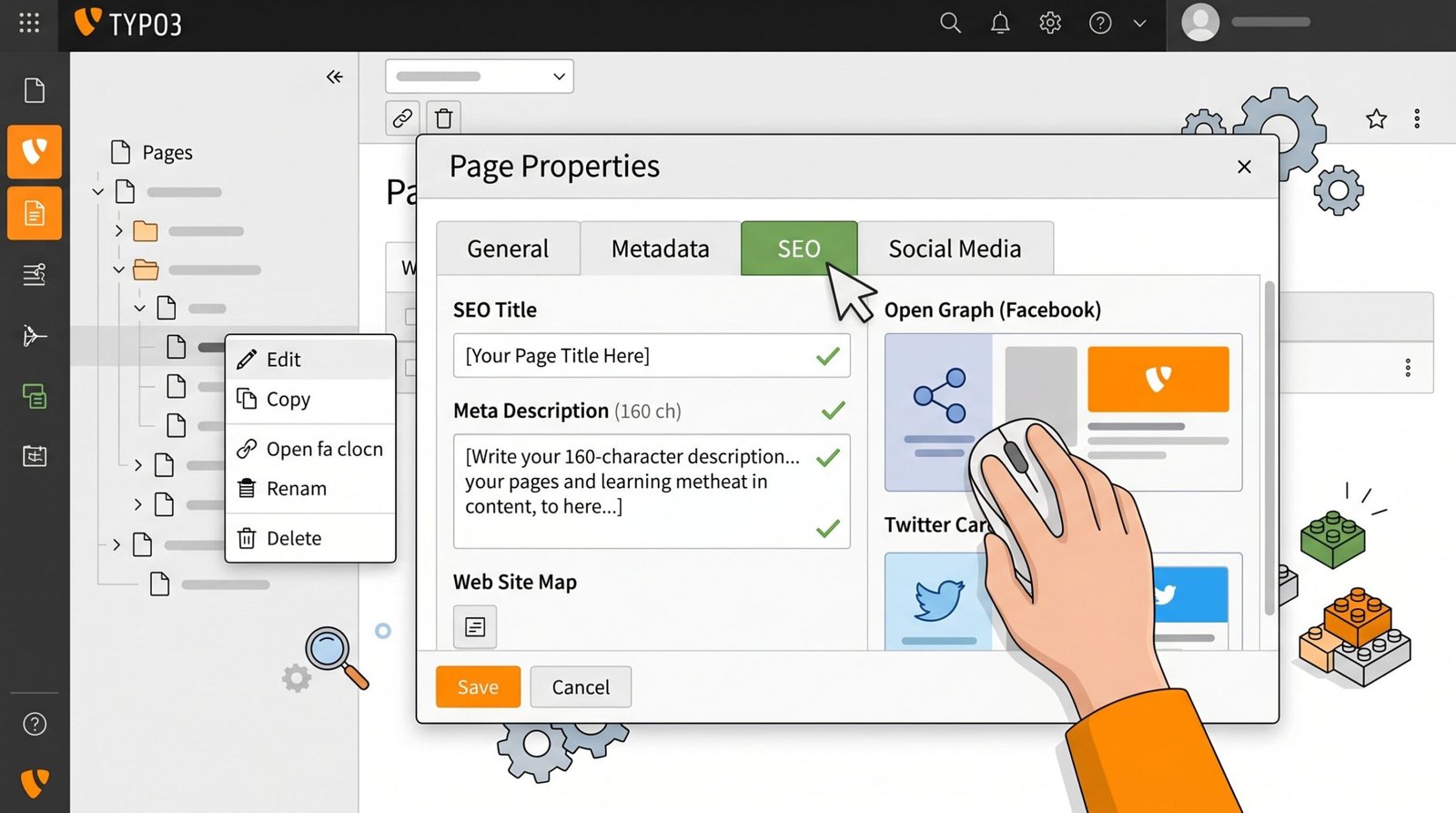
To succeed in search engine results pages (SERPs), you must first understand the foundational settings within TYPO3. Over the years, the developers behind this CMS recognized the growing need for built-in marketing tools. Starting from version 9, they integrated a dedicated SEO module directly into the core system.
This means you do not immediately need to download dozens of third-party plugins just to perform basic tasks. The Page Properties module is where you will spend most of your time. When you right-click any page in your TYPO3 page tree and select “Edit”, you will see a series of tabs. The most important tab for your daily work is the “SEO” tab, alongside the “Metadata” tab.
In these tabs, you have direct fields to input your specific keywords, titles, and descriptions. You also have tools to manage social media sharing previews (Open Graph for Facebook and Twitter Cards). The baseline rule for TYPO3 optimization is simple: never leave these core fields blank. If you create a new page, you must fill out its properties. Leaving them blank forces search engines to guess what your page is about, and they often guess wrong.
Before moving into advanced strategies, ensure that your entire team knows how to access the Page Properties and understands the function of the SEO tab. This baseline knowledge is the foundation of everything that follows.
On-Page SEO in TYPO3 (Detailed)
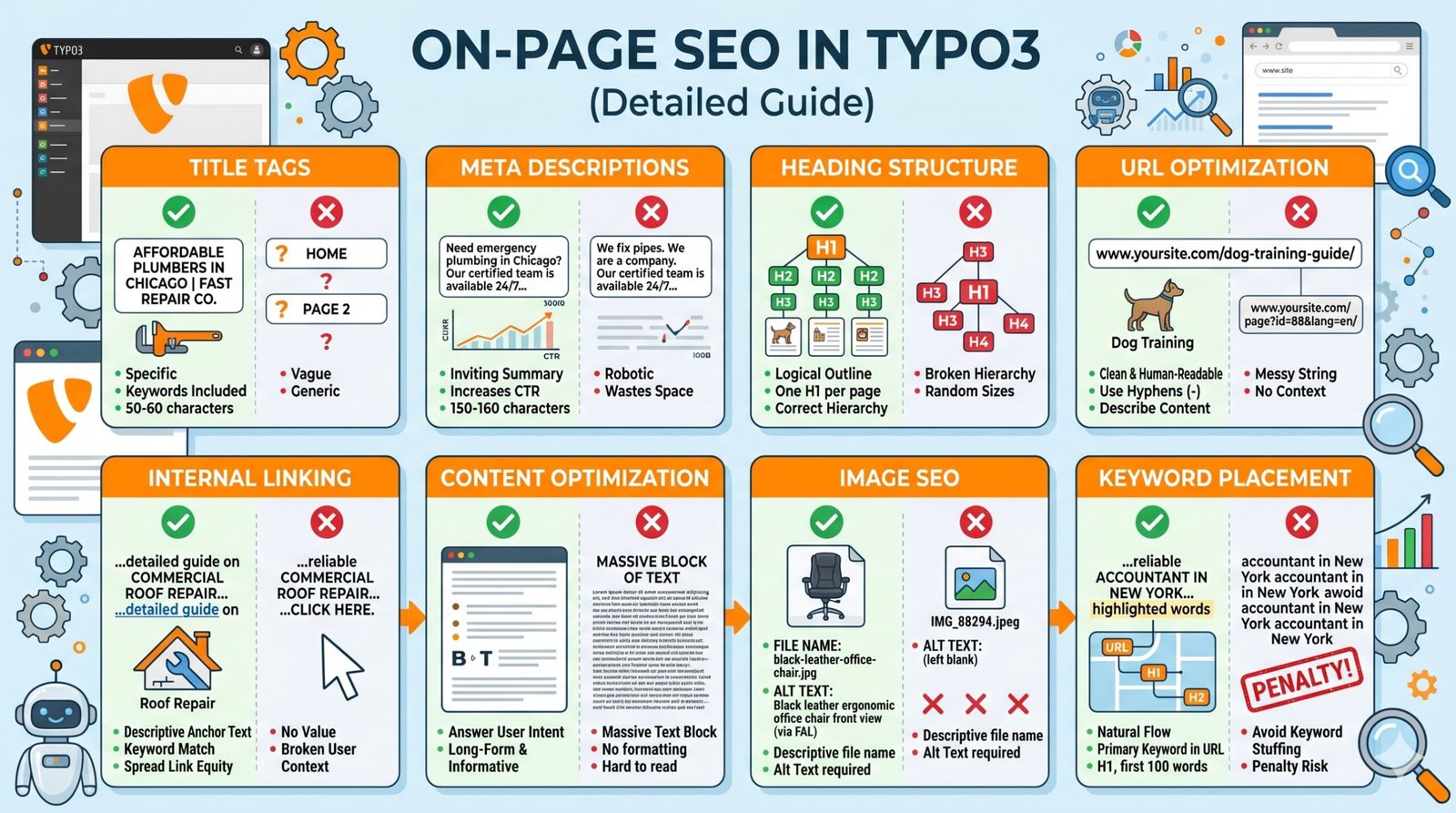
On-page optimization involves configuring the actual content and HTML source code of a page. This is completely within your control. TYPO3 makes this process highly systematic. Let us break down every critical element you must configure.
Title Tags
The title tag is the most prominent element shown in search engine results. It tells users and search engines the main topic of your page. In TYPO3, you set this within the Page Properties under “Title for search engines”. If left blank, TYPO3 will usually fall back to the internal page name, which might be something unhelpful like “Home” or “Page 2”. You must write specific, compelling titles that include your primary keywords. Keep them between 50 to 60 characters so they do not get cut off in search results.
Affordable Plumbers in Chicago | Fast Repair Co.
Explanation: This title includes the primary keyword (“Plumbers in Chicago”), a benefit (“Affordable”), and the brand name. It fits perfectly within the character limit.
Home
Explanation: “Home” tells the search engine absolutely nothing about what the business does, where it is located, or why a user should click on it.
Meta Descriptions
The meta description sits right below the title tag in search results. While Google states that meta descriptions do not directly impact rankings, they drastically impact your click-through rate (CTR). A higher CTR signals to search engines that your page is relevant. In TYPO3, this is located in the SEO tab under “Description”. Aim for 150 to 160 characters. Write an inviting summary that encourages users to click.
Need emergency plumbing in Chicago? Our certified team is available 24/7 for leak repairs and pipe fixing. Call today for a free estimate!
Explanation: It contains the keyword, clear services, a sense of urgency, and a strong call to action at the end.
We fix pipes. We are a company in Chicago. Welcome to our website.
Explanation: This is completely robotic, boring, wastes space, and gives no compelling reason for a customer to choose this link over a competitor.
Heading Structure
Headings (H1, H2, H3, etc.) create a logical outline for your content. Search engines rely heavily on headings to understand the hierarchy and main points of your text. TYPO3 allows content editors to select heading types when creating content elements. Every single page must have exactly one H1 tag (usually the main title). Subsections should use H2s, and nested topics should use H3s. Never skip heading levels (e.g., jumping from an H1 to an H4) just because you like the font size better.
H1: Complete Guide to Dog Training
H2: Puppy Training Basics
H3: Potty Training Techniques
Explanation: The structure flows logically from a broad topic to a narrower sub-topic, creating a perfect hierarchy for search engines to read.
H3: Complete Guide to Dog Training
H1: Puppy Training Basics
H4: Potty Training Techniques
Explanation: The hierarchy is completely broken. There is no top-level H1 at the beginning, and heading sizes are chosen randomly for visual styling rather than structure.
URL Optimization
Clean, readable URLs are essential. In older versions of TYPO3, URLs looked like messy strings of numbers (e.g., `index.php?id=45`). Modern TYPO3 includes built-in routing to create human-readable paths. You must configure your page slugs to reflect the page topic. Keep them short, use hyphens instead of underscores, and remove stop words (like “and”, “the”, “a”).
www.yoursite.com/dog-training-guide/
Explanation: The URL is clean, uses hyphens to separate words, and clearly tells the user and search engine exactly what the page is about.
www.yoursite.com/page?id=88&lang=en/
Explanation: This URL is a messy parameter string. It provides zero context about the content of the page.
Internal Linking
Internal linking connects the pages of your website together. This helps users navigate your site and helps search engines establish an information hierarchy. It also spreads link equity (ranking power) across your pages. When adding links in TYPO3’s Rich Text Editor, always use descriptive anchor text. For instance, just like conducting thorough AI LLM SEO audits helps identify website flaws, proper internal linking helps search engines map your site architecture accurately.
Read our detailed guide on commercial roof repair to learn more.
Explanation: The anchor text directly matches the keyword of the target page, giving search engines clear context.
To learn about commercial roof repair, click here.
Explanation: “Click here” provides absolutely no descriptive value. The search engine does not learn anything about the destination page.
Content Optimization
Your text needs to answer the user’s intent clearly and thoroughly. Search engines favor long-form, highly informative content that fully resolves a search query. Within your TYPO3 text elements, break up large walls of text with bullet points, bold text, and short paragraphs. Ensure your writing is easy to digest.
Do not simply write a massive block of text. Use formatting to guide the reader’s eye. Provide real value, answer specific questions, and keep your sentences relatively short.
Image SEO
Search engines cannot “see” images; they read the code behind them. When you upload an image to the TYPO3 Filelist, you must fill out the Alternative Text (Alt Text) and ensure the file name itself is descriptive. TYPO3’s File Abstraction Layer (FAL) makes it easy to set this metadata once, and it will automatically apply everywhere that specific image is used on your site.
File name: black-leather-office-chair.jpg
Alt Text: Black leather ergonomic office chair front view
Explanation: Both the file name and the alt text accurately describe the image content, making it highly indexable for Google Image Search.
File name: IMG_88294.jpeg
Alt Text: (left blank)
Explanation: The file name is a random camera string, and the missing alt text means search engines have zero idea what this image displays.
Keyword Placement
Keywords remain a vital part of optimization. However, the days of cramming a word into a paragraph fifty times are over. You need to place your primary keyword strategically. Put it in the URL, the H1, the first 100 words of your content, and at least one H2. After that, use variations and synonyms naturally throughout the text.
If you are looking for a reliable accountant in New York, our firm provides comprehensive tax preparation services. Managing your finances effectively is crucial for business growth.
Explanation: The keyword “accountant in New York” is used naturally, surrounded by related terms like “tax preparation” and “finances”.
Are you looking for an accountant in New York? Our accountant in New York team is the best accountant in New York. Hire an accountant in New York today.
Explanation: This is blatant keyword stuffing. It reads terribly for human visitors and will likely result in a search engine penalty.
Technical SEO in TYPO3 (Detailed)
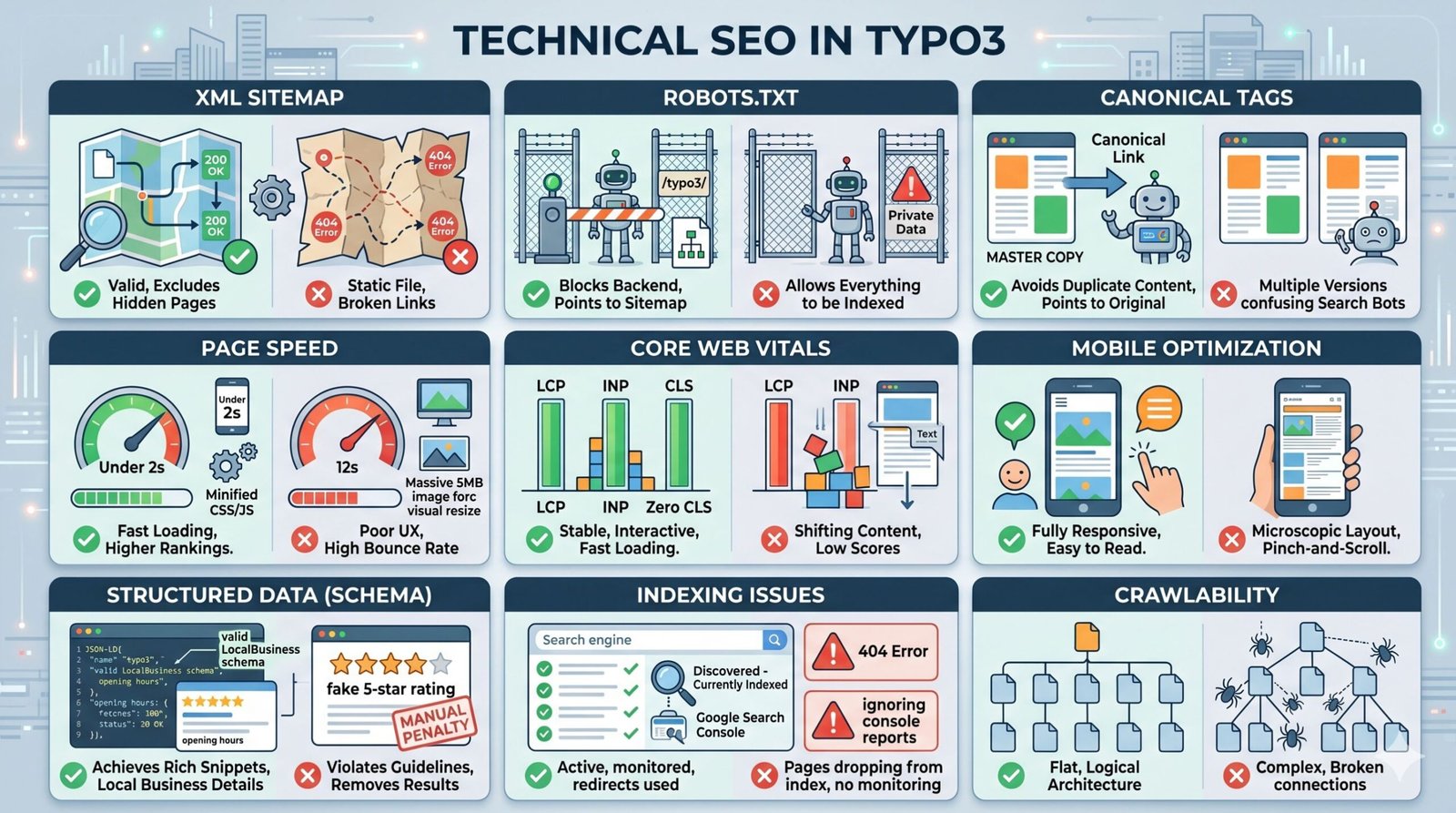
Technical optimization focuses on the backend infrastructure of your site. It ensures that search engine bots can crawl, render, and index your pages without running into roadblocks. TYPO3 is naturally strong in this area, but you must configure it correctly to see results.
XML Sitemap
An XML sitemap is a file that lists all the important pages of your website. It acts as a roadmap for search engine bots. Starting from version 9, TYPO3 core generates XML sitemaps automatically. You simply need to ensure it is activated and configured to exclude hidden pages or pages you do not want to index. You can access the sitemap via `yourdomain.com/?type=1533906425` (the default type number) or a configured URL path.
An automatically updating XML sitemap that only lists pages with a “200 OK” status code and excludes thin utility pages like login screens.
Explanation: This ensures search bots spend their crawl budget only on high-value, rankable content.
A static XML file uploaded manually three years ago containing hundreds of broken 404 links.
Explanation: Search engines will quickly realize your sitemap is untrustworthy and may stop using it to find new content.
Robots.txt
The robots.txt file sits in the root directory of your server. It gives strict instructions to search bots about which folders they are allowed to crawl and which are off-limits. For TYPO3, it is highly critical to block backend directories so that private system files are not indexed in public search results.
User-agent: *Disallow: /typo3/Sitemap: https://www.site.com/sitemap.xml
Explanation: This allows bots to crawl the whole site but strictly blocks the sensitive `/typo3/` backend folder, while also pointing directly to the sitemap.
User-agent: *Disallow: /
Explanation: A single slash here tells all search engines to completely ignore your entire website. This mistake destroys your rankings overnight.
Canonical Tags
Duplicate content is a major issue. Sometimes, one page can be accessed via multiple URLs (e.g., with and without ‘www’, or with tracking parameters). A canonical tag tells the search engine which version is the “master” copy. TYPO3 handles this very well via the Page Properties SEO tab. You can manually set a canonical link, or TYPO3 will self-reference the page by default.
Page A and Page B have identical content. Page B contains a canonical tag pointing directly to Page A.
Explanation: Google understands that Page A is the original, consolidating all ranking signals to that specific URL.
A page has a canonical tag that points to a dead URL resulting in a 404 Error.
Explanation: You are telling the search engine that the main version of your page no longer exists, which can result in the page being dropped from the index entirely.
Page Speed
Fast loading times are critical for user experience and rankings. You can read extensive documentation on this via Google Search Central. In TYPO3, speed optimization requires enabling system caching, minimizing CSS and JavaScript, and compressing images. TYPO3 has powerful built-in caching mechanisms that must be configured by a developer.
Server-side caching is enabled, CSS files are minified, and a page fully loads visually in under 2 seconds on mobile.
Explanation: Users stay on the page, bounce rates remain low, and Google rewards the site with better mobile rankings.
Uploading raw 5MB image files straight from a camera and forcing the browser to resize them.
Explanation: The page takes 12 seconds to load. Users leave immediately, signaling to search engines that your site provides a poor experience.
Core Web Vitals
These are specific metrics created by Google to measure user experience: Largest Contentful Paint (LCP – loading time), Interaction to Next Paint (INP – interactivity), and Cumulative Layout Shift (CLS – visual stability). To fix these in TYPO3, developers must ensure fonts load properly without causing text to shift, and main images are preloaded.
Defining specific width and height attributes on all image tags in your Fluid templates.
Explanation: The browser reserves the exact space for the image before it loads, preventing the text from suddenly jumping down the screen (Zero CLS).
Loading heavy third-party tracking scripts at the very top of the HTML document.
Explanation: The scripts block the main content from rendering, resulting in a terrible LCP score.
Mobile Optimization
Google uses mobile-first indexing. This means it evaluates the mobile version of your site to determine rankings. Your TYPO3 frontend (usually built with fluid templates) must be fully responsive. Elements must scale correctly, and buttons must be large enough to tap easily.
Using CSS media queries to stack text below images on small screens and providing a clean hamburger navigation menu.
Explanation: The user can read everything perfectly without having to zoom in or scroll sideways.
Forcing a 1200px wide desktop layout onto a mobile screen.
Explanation: Text becomes microscopic. The user is forced to pinch and scroll horizontally, resulting in an immediate exit.
Structured Data (Schema)
Structured data helps search engines understand the exact context of your content. By adding JSON-LD code to your site, you can achieve rich snippets in search results (like star ratings, event dates, or recipe cooking times). While TYPO3 core provides some basic markup, you often need developer configuration or extensions to map complex data types correctly.
Implementing valid LocalBusiness schema containing your exact address, opening hours, and phone number.
Explanation: Google can confidently display your business details in local map packs and rich results.
Adding review schema with fake 5-star ratings for a page that does not actually sell a product or collect user reviews.
Explanation: This violates Google’s guidelines and will result in a manual penalty, stripping all rich results from your site.
Indexing Issues
If your pages are not in Google’s database, you will not get traffic. You must connect your TYPO3 site to Google Search Console to monitor coverage reports. Look for “Crawled – currently not indexed” or “Discovered – currently not indexed” errors. These usually indicate poor content quality or server response issues.
Regularly checking Search Console, fixing 404 errors by adding 301 redirects via TYPO3’s Redirect module.
Explanation: You preserve link equity and ensure search engines always find active pages.
Ignoring Google Search Console entirely and wondering why traffic is dropping.
Explanation: You miss critical warnings about server downtime or manual actions applied to your site.
Crawlability
Search engines send “spiders” to read your site by following links. If your architecture is too deep, they might give up before finding your best content. As noted by industry leaders like Ahrefs, managing your crawl budget is essential for large websites. TYPO3 allows you to create flat, logical page trees.
Every important page on your website can be reached within three clicks from the homepage.
Explanation: Search bots easily navigate the site, index new content rapidly, and understand the relationship between pages.
Creating “orphan pages” that exist in the system but have zero internal links pointing to them.
Explanation: The search engine bot will never find the page because there is no bridge (link) to reach it.
TYPO3 SEO Extensions
While modern TYPO3 has fantastic core capabilities, sometimes you need extra features. Extensions can automate repetitive tasks and provide better analysis tools directly within the backend. If you are managing a massive site, utilizing the right extensions saves hundreds of hours.
cs_seo (Clickstorm SEO): This is one of the most popular extensions available. It provides an excellent overview module where you can see the meta titles and descriptions of all your pages in a single grid list. This prevents you from having to click into every single page individually. It also offers focus keyword analysis, giving you immediate feedback on whether you used your keyword in the right places (similar to how plugins operate on simpler platforms).
Yoast SEO for TYPO3: Famous on other platforms, Yoast also has an integration for TYPO3. It provides the familiar traffic light system (Red, Orange, Green) to rate your content readability and keyword density. This is highly useful for content editors who may not be deeply technical but need guidance while writing.
schema.org Extensions: For structured data, there are several extensions that allow you to map TYPO3 records (like news articles or events) directly to JSON-LD formats without requiring developers to write custom code for every new content type.
TYPO3 URL Structure Best Practices
Proper URL configuration in TYPO3 relies heavily on the `config.yaml` site configuration file. A poorly structured URL is difficult for users to share and confusing for search engines to categorize. Here are the strict rules you should follow.
First, maintain a logical folder structure. If you have a category for “Services” and a subpage for “Consulting”, the URL should ideally reflect this hierarchy: `yoursite.com/services/consulting/`. This creates a natural breadcrumb trail.
Second, enforce consistency regarding trailing slashes. Decide whether your URLs will end with a slash (`/`) or without one. Pick one standard and force redirects to that standard. Having both `yoursite.com/about` and `yoursite.com/about/` technically creates duplicate content issues if not managed properly. The Site Management module in TYPO3 allows you to enforce these rules globally.
Third, keep URLs as short as possible. Remove unnecessary filler words. A URL like `/our-amazing-services/we-provide-great-financial-consulting/` is terrible. Shorten it directly to `/services/financial-consulting/`.
Common TYPO3 SEO Mistakes
Even seasoned developers make mistakes when configuring TYPO3. Because the system is so large, a single misconfiguration in a core file can cascade across thousands of pages. Be aware of these major pitfalls.
- Leaving the “No Index” box checked: In Page Properties, there is a simple checkbox to prevent search engines from indexing the page. Developers often check this on a staging server. When pushing the site live, they forget to uncheck it, making the entire website invisible to Google.
- Ignoring the Redirects Module: When you delete an old page or change its URL, the old link breaks (404 error). You must use the TYPO3 redirects module to create a 301 redirect pointing the old URL to the new one. Failing to do this destroys your historical link authority.
- Overusing Extensions: While extensions are helpful, installing too many poorly coded third-party plugins will drastically slow down your server response times, hurting your Core Web Vitals scores.
- Hardcoding Meta Tags: Developers sometimes hardcode titles or generic descriptions into the main fluid template. This overrides the Page Properties and results in every single page on the website having the exact same meta description. This is disastrous for optimization.
Real-Life Practical Tips
Let us move beyond theory. Here are highly practical steps you can implement on your TYPO3 installation this week.
Audit your large files: Use the Filelist module to find images larger than 500KB. Delete them or compress them using external tools before re-uploading. Alternatively, ensure your developer has configured ImageMagick or GraphicsMagick properly on the server to automatically output WebP image formats.
Review site architecture: Open your page tree. Is it a massive, unorganized list? Group related pages into folders or parent pages. This not only cleans up your URLs but makes internal linking much easier for your team.
Use the “Notes” tab: TYPO3 includes an internal notes tab in Page Properties. Use this to leave messages for your team. For example: “Last updated meta tags on Jan 14. Target keyword is ‘commercial roofing’.” This keeps your entire marketing team aligned.
TYPO3 vs WordPress
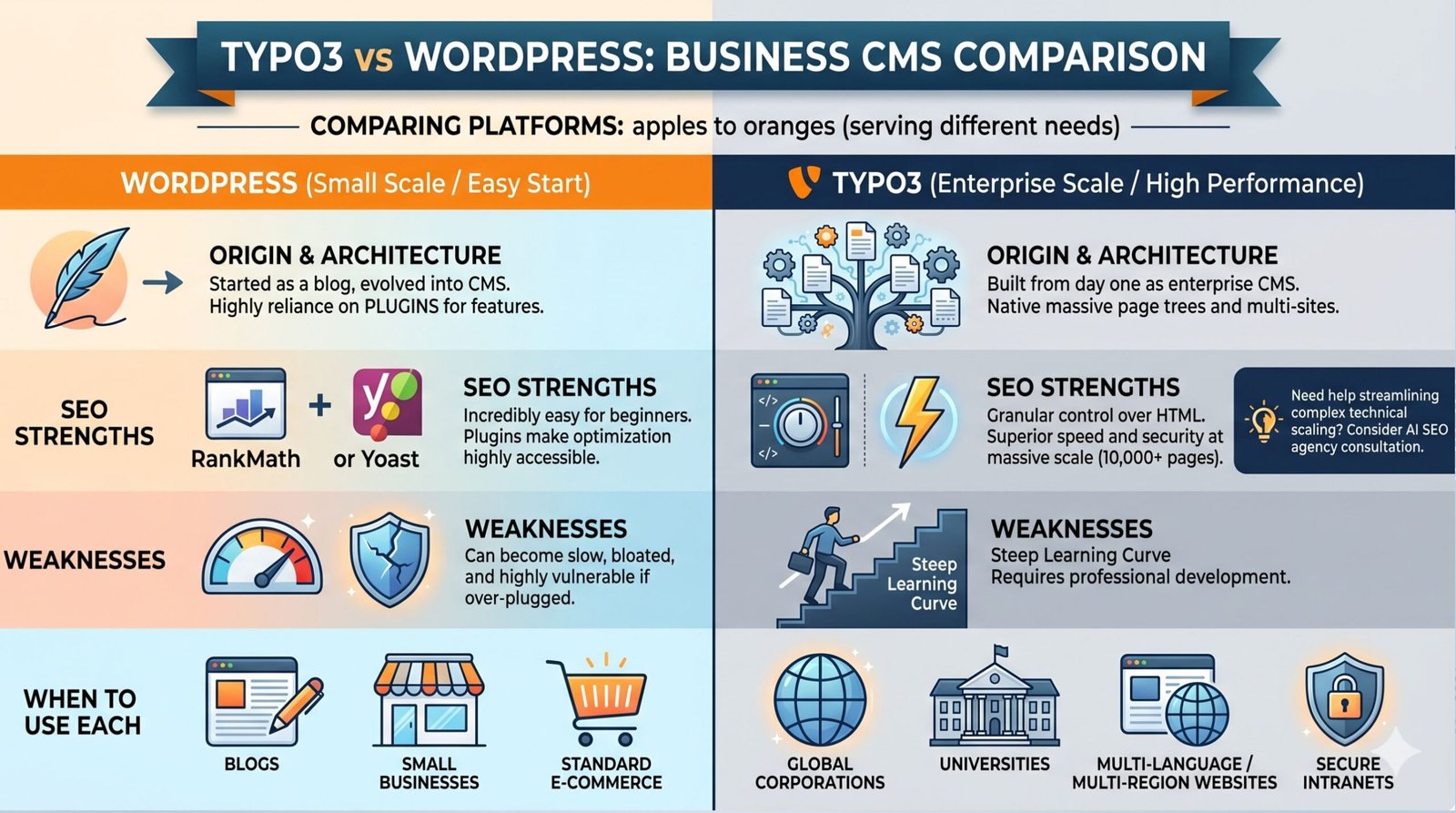
When comparing platforms, people always look at WordPress first because of its massive market share. However, comparing them directly is often comparing apples to oranges. They serve entirely different business needs.
Clear Comparison: WordPress started as a blogging platform and evolved into a CMS. It is highly reliant on plugins for almost every advanced feature. TYPO3 was built from day one as an enterprise CMS. It handles massive, complex page trees and multi-site installations natively.
SEO Strengths: WordPress is incredibly easy for beginners. Plugins like Yoast or RankMath make optimization highly accessible. TYPO3, on the other hand, gives developers granular control over the output of every single HTML tag without plugin bloat. TYPO3’s speed and security at a massive scale (10,000+ pages) are far superior. If you are struggling to manage this scale, consulting an AI SEO agency can help streamline the technical process.
Weaknesses: WordPress can become slow, bloated, and highly vulnerable to hacking if you install too many plugins. TYPO3’s main weakness is its steep learning curve. A regular user cannot simply set up a TYPO3 site over the weekend; it requires professional development.
When to use each: Use WordPress for blogs, small businesses, and standard e-commerce. Use TYPO3 for global corporations, universities, multi-language/multi-region websites, and highly secure intranets.
Drupal vs TYPO3
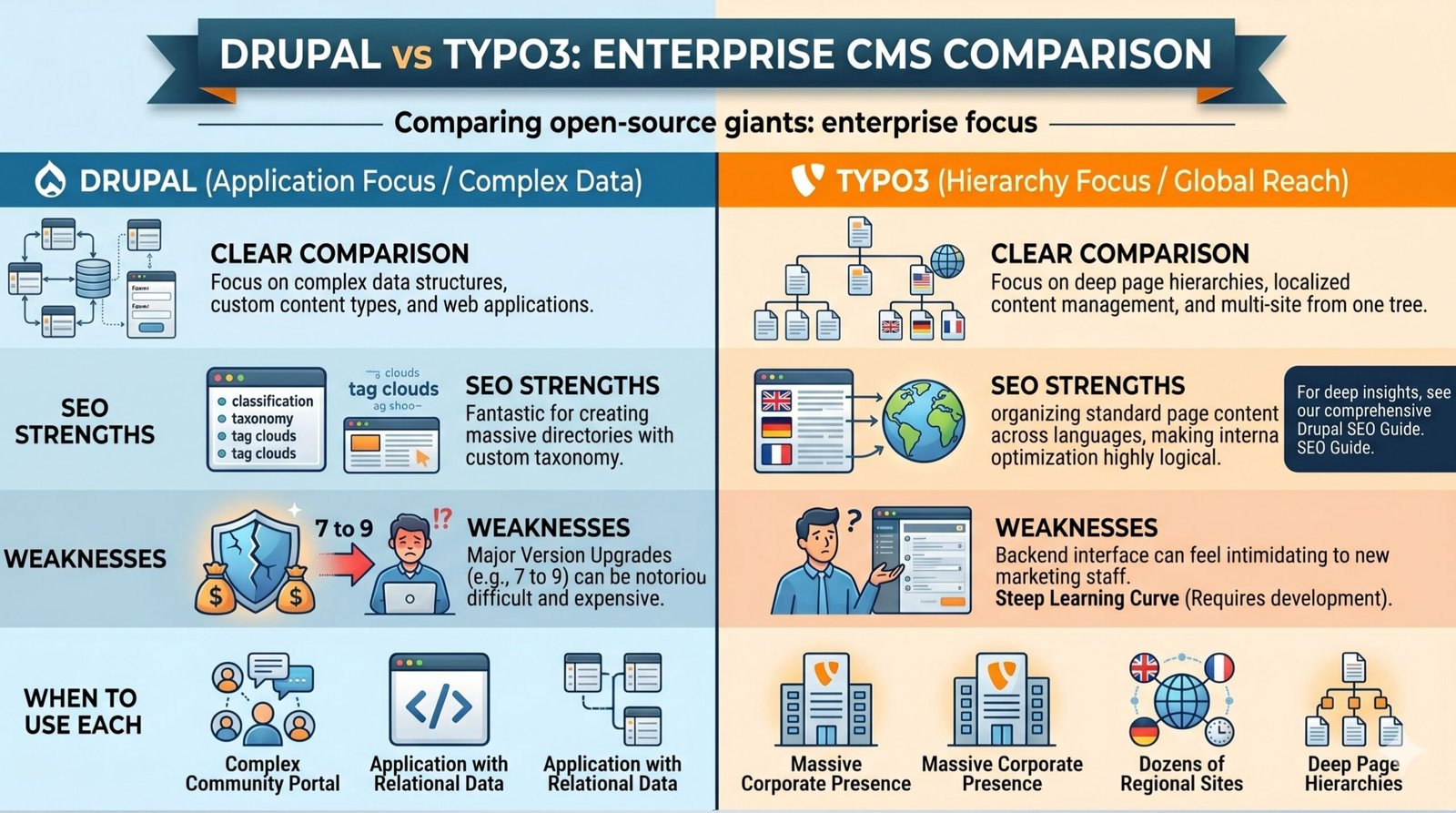
This is a much closer comparison. Both are enterprise-grade, open-source systems favored by large organizations and governments.
Clear Comparison: Drupal focuses heavily on complex data structures, custom content types, and creating web applications. TYPO3 focuses more on deep page hierarchies, localized content management, and maintaining multiple sites from one tree. For an in-depth look at Drupal’s specific capabilities, check out our comprehensive Drupal SEO guide.
SEO Strengths: Both offer excellent technical foundations. Drupal is fantastic for creating massive directories with custom taxonomy. TYPO3 excels in organizing standard page content across multiple languages, making international optimization highly logical.
Weaknesses: Both require highly skilled developers. Drupal upgrades between major versions (e.g., Drupal 7 to 9) can be notoriously difficult and expensive. TYPO3 upgrades are generally smoother, but the backend interface can feel intimidating to new marketing staff.
When to use each: Use Drupal if you are building a complex community portal or an application heavily reliant on relational data. Use TYPO3 if you are managing a massive corporate presence with dozens of regional sites and deep page hierarchies.
TYPO3 vs Joomla
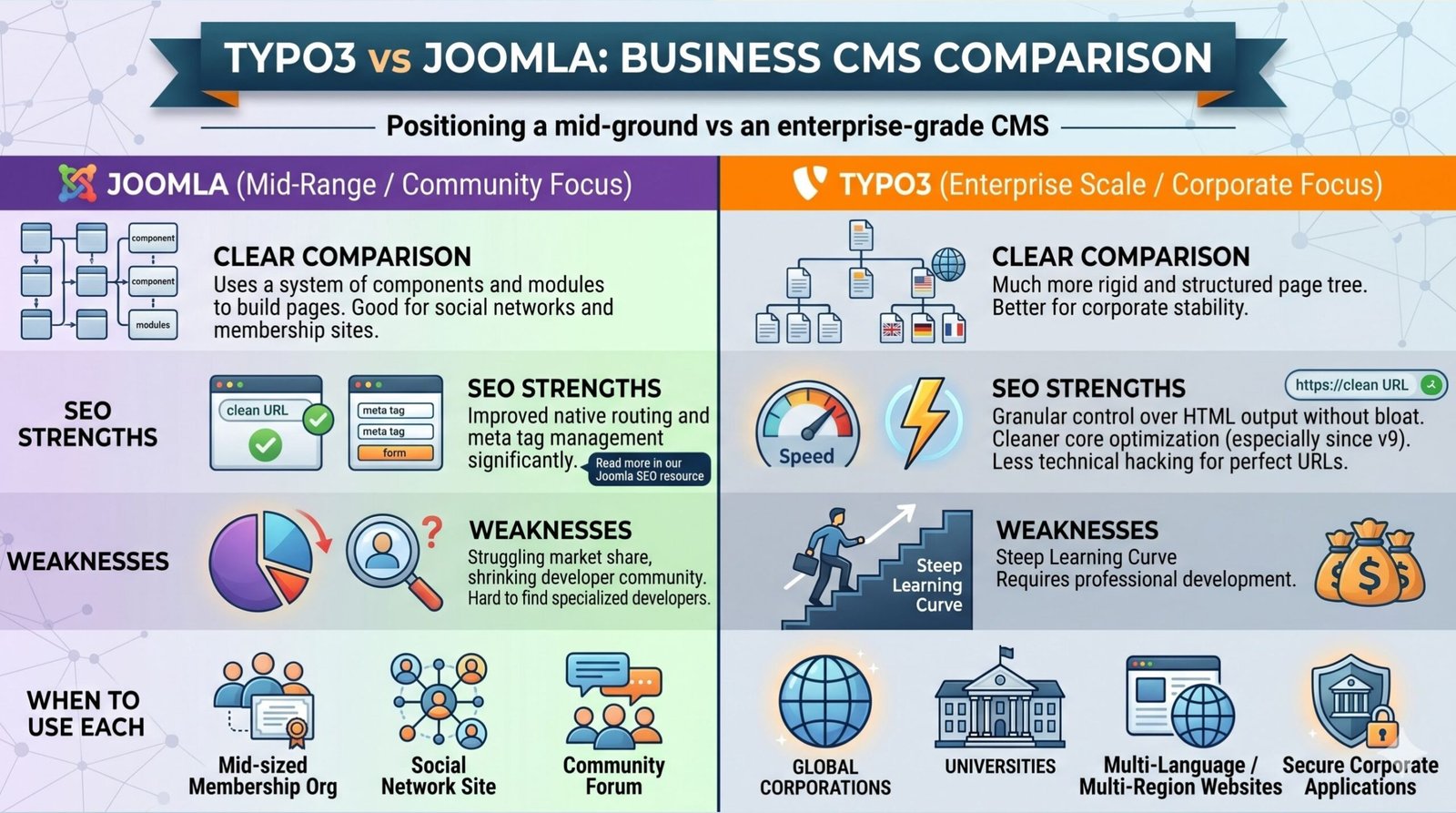
Joomla sits somewhere in the middle. It is more complex than WordPress but less robust than TYPO3 or Drupal.
Clear Comparison: Joomla uses a system of components and modules to build pages. It is good for social networks and membership sites. TYPO3 is much more rigid and structured, which is better for corporate stability. You can read more about Joomla’s specific traits in our Joomla SEO resource.
SEO Strengths: Joomla has improved its native routing and meta tag management significantly. However, TYPO3’s core optimization features, especially since version 9, are much cleaner and require less technical hacking to achieve perfect URL structures.
Weaknesses: Joomla has struggled with market share in recent years, leading to a shrinking developer community. Finding highly specialized Joomla developers is becoming harder. TYPO3 retains a massive, highly dedicated community, especially in Europe.
When to use each: Joomla might be suitable for a mid-sized membership organization. However, for almost any serious corporate application, TYPO3 provides better longevity, security, and scalability.
TYPO3 vs Other CMS (Table)
To help you make the best architectural decision for your business, review this comparison chart of the most prominent content management platforms available today.
| CMS | SEO Flexibility | Ease of Use | Speed Optimization | Scalability | Best For |
|---|---|---|---|---|---|
| TYPO3 | Very High | Hard | Excellent | Enterprise | Large corporations, universities |
| WordPress | High (via plugins) | Very Easy | Moderate | Medium | Blogs, small to mid-sized business |
| Drupal | Very High | Hard | Excellent | Enterprise | Complex data apps, government |
| Joomla | Medium | Moderate | Moderate | Medium | Membership sites, mid-tier business |
| Webflow | High | Moderate (visual) | Excellent | Medium | Design-focused sites (See Webflow SEO) |
| Magento | High | Hard | Requires Dev | Enterprise | Massive eCommerce (See Magento SEO) |
| BigCommerce | High | Easy | Excellent (SaaS) | High | Growing eCommerce (See BigCommerce SEO) |
Frequently Asked Questions
Is TYPO3 good for SEO?
Yes, absolutely. TYPO3 is actually one of the best platforms for optimization if configured correctly by a professional. Because it separates content from design, it generates highly clean HTML code. Search engines love clean code. Furthermore, since version 9, it includes built-in features for XML sitemaps, canonical tags, and granular meta tag control. Its ability to handle massive, multi-language websites securely makes it far superior to simpler platforms when dealing with large-scale corporate optimization projects.
How do I edit meta tags in TYPO3?
Editing meta tags is straightforward. Navigate to the backend page tree, right-click on the specific page you want to edit, and select “Edit” (the pencil icon). Look for the “SEO” tab and the “Metadata” tab at the top of the editing screen. Inside the SEO tab, you will find dedicated fields for “Title for search engines” and “Description”. Fill these out carefully with your targeted keywords. Save the document, and clear your frontend cache to ensure the changes appear live immediately.
Do I need an extension for TYPO3 SEO?
For basic operations, no. The modern TYPO3 core handles titles, descriptions, canonical tags, and XML sitemaps perfectly without any third-party additions. However, if you want advanced workflow tools—such as a visual traffic light system for keyword density, bulk editing interfaces, or automated focus keyword analysis—extensions like cs_seo or Yoast for TYPO3 are highly recommended. They save significant time for marketing teams managing large amounts of daily content.
How can I improve page speed in my TYPO3 site?
Improving speed requires several technical steps. First, ensure TYPO3’s built-in caching framework is fully activated. Second, implement image compression. Use TYPO3’s image rendering capabilities to automatically serve smaller file sizes and modern formats like WebP. Third, minify your CSS and JavaScript files so the browser downloads less data. Finally, utilize a robust hosting environment. Because TYPO3 is a heavy system, it requires a strong server, adequate PHP memory limits, and ideally a Content Delivery Network (CDN) for global traffic.
What is the best way to handle redirects in TYPO3?
Never rely on external `.htaccess` files for daily page redirects if you can avoid it. Instead, use the built-in Redirects module found in the backend menu. When you delete a page or change a URL slug, go to the Redirects module and create a “301 Moved Permanently” rule. Input the old URL path and select the new destination page from your page tree. This ensures that any incoming links from other websites do not hit a dead 404 error page, preserving your valuable link equity.
How does TYPO3 handle XML sitemaps?
Starting with version 9, TYPO3 generates XML sitemaps natively. You configure this within your site configuration yaml file. The system automatically creates a sitemap index and separate sitemaps for pages, records (like news), and different languages. It strictly follows best practices, automatically excluding pages that are marked “No Index”, hidden from navigation, or require user login. This guarantees that search engines only receive a list of high-quality, publicly accessible URLs to crawl.
How can I implement schema markup in TYPO3?
Implementing schema markup (JSON-LD) can be done in a few ways. For simple things like an organization’s logo and contact details, you can add the JSON-LD script directly into your site’s main Fluid template or via typoscript. For dynamic content like news articles, recipes, or events, you should use extensions designed for schema generation, or have your developer modify the specific Fluid template for that content type to output the correct JSON-LD variables automatically based on the backend data.
Why are my TYPO3 pages not indexing on Google?
There are several common culprits. First, check the Page Properties; ensure the “No Index” checkbox under the SEO tab is not accidentally checked. Second, review your robots.txt file to ensure you are not blocking search engines from crawling the entire site. Third, verify your domain in Google Search Console and inspect the specific URL. Google might report issues like “Crawled – currently not indexed”, which often points to thin, low-quality content, or server timeout errors preventing the bot from rendering the page.
How do I optimize images in TYPO3 for search engines?
Image optimization happens in the Filelist module. When you upload a picture, edit its metadata immediately. Fill out the “Alternative Text” field with a descriptive, keyword-rich explanation of the image. This is crucial for accessibility and Google Image search. Also, ensure the actual file name is descriptive before uploading (e.g., `blue-widget.jpg` instead of `IMG123.jpg`). Finally, rely on TYPO3’s frontend rendering to size the images appropriately so you do not load massive files on mobile devices.
Can I manage multiple domains with good SEO in TYPO3?
Yes, managing multiple domains is one of TYPO3’s greatest strengths. You can run dozens of separate websites, with different domain names, from a single backend tree. For optimization, you configure each site root individually using the Site Management module. You can set specific canonical tags, separate XML sitemaps, and independent robots.txt rules for every single domain. This ensures that search engines treat them as distinct entities without causing duplicate content penalties across your network.
Complete TYPO3 SEO Checklist
Use this comprehensive checklist before launching any new page or auditing your existing TYPO3 installation.